
Double green checkmarks appear the instant your message is opened — the read-receipt experience Outlook and Gmail should have shipped with.
7-day Pro trial · No credit card · Microsoft or Google sign-in
Last opened today at 2:18 PM · Desktop · San Francisco
No password to create. OAuth connects the add-in or extension to the mailbox you already use.
One toggle in Outlook's ribbon or Gmail's compose bar. Everything else about your send stays identical.
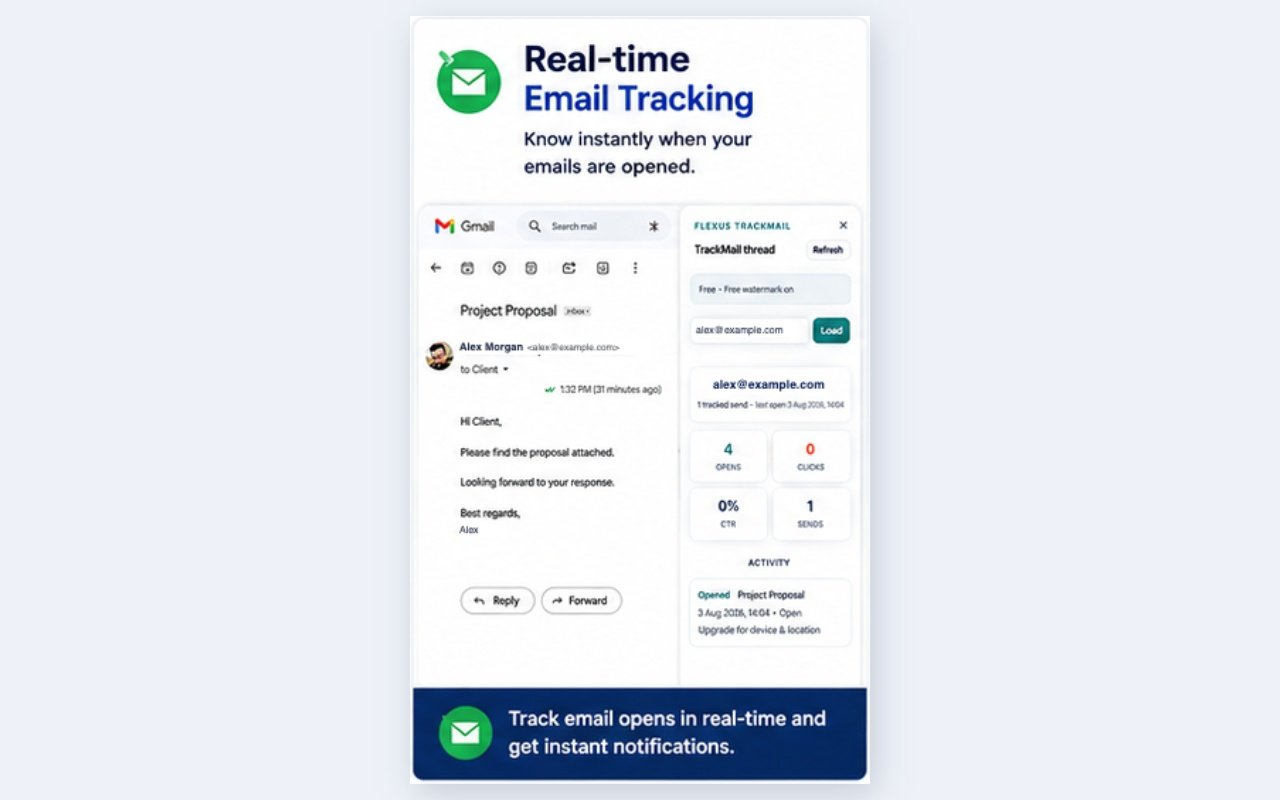
Opens, clicks, devices and timing land in your sent view — plus an alert within seconds of the open.
Send exactly as you always have. TrackMail records opens and link clicks in the background and reports back where you already work.
Microsoft sign-in for Outlook. Google sign-in for Gmail. One account shares opens, clicks, reminders, and billing.
Track on send, open the task pane for thread KPIs and Remind Me, and upgrade right from the web app.
Outlook feature guide →A Track toggle on compose, side-panel analytics, and desktop alerts the moment your mail is opened.
 Add the extension
See exactly when emails were opened, with device and approximate location signals.
Links route through TrackMail so genuine clicks are counted individually, per URL.
Web push in the app and Chrome notifications in Gmail on every open or click.
Follow-up conditions and scheduled sends via Microsoft Graph or the Gmail API.
OAuth only. Workspace isolation. Published privacy policy and terms.
Keep tracking after the trial with a small watermark — upgrade whenever you like.
Same plans for Outlook and Gmail. No credit card for the trial.
What double checks mean, how opens are detected, and how to follow up without being pushy.

Install the Chrome extension, toggle Track, and see opens next to your sent mail.
Open any sent thread and see opens, clicks, and CTR in the TrackMail task pane.
Yes. Use the Outlook add-in with Microsoft sign-in and the Gmail Chrome extension with Google sign-in. One TrackMail account covers both.
When a tracked message is opened, TrackMail shows double green checks and open counts in your Outlook task pane or Gmail sent view — exactly like a read receipt, without asking your recipient to confirm anything.
No. Sign in only with Microsoft (Outlook) or Google (Gmail) OAuth — nothing new to remember and nothing for us to store.
You keep Free tracking with a watermark and blurred links, or upgrade to Pro ($3.99/user/mo) or Business ($6.99/user/mo).
Your Google email and profile sign you in. The Gmail send permission is used only for send-later that you schedule. Full detail is in our Google API Disclosure.
Start your trial with Microsoft or Google. Works in Outlook and Gmail from the first send.
Start free trial